---
title: "Cybrary for Teams: Invite New Team Members"
description: Cybrary for Teams inviting team members
---
[Skip to content](https://help.cybrary.it/cybrary-for-teams-invite-new-team-members#main-content)
English
Show submenu for translations
[](https://help.cybrary.it/?hsLang=en)
Open main navigation
Close main navigation
- English
Show submenu for translations
- [Contact us](mailto:support@cybrary.it)
[Contact us](mailto:support@cybrary.it)
How can we help you?
- There are no suggestions because the search field is empty.
1. [Cybrary User Help Center](https://help.cybrary.it/?hsLang=en)
2. [Cybrary for Teams](https://help.cybrary.it/cybrary-for-teams?hsLang=en)
December 16, 2025
# Cybrary for Teams: Invite New Team Members
**
*How to invite new team members to your Cybrary for Business team.*
(Remember, only users with the Org Owner or Admin role can invite team members)
Once you’ve logged into Cybrary, navigate to the Organization tab on the left side of your screen. From there, a sub-menu will appear where you can Click into the **People** tab. Click **Invite to Team**. A pop-up window will appear featuring instructions and a team-specific URL.
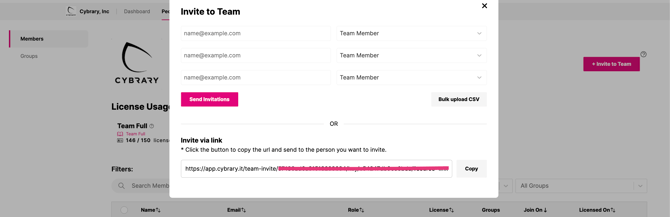
Click the icon to copy the URL and send it to the person you wish to invite. Once the person clicks the link, they will be prompted to create an account and will automatically join the team. Zero hassle!
Please note: For new members to receive an active license, you will need to mark them as Licensed.
**For members:** When creating an account, the following fields are required: First Name, Last Name, Email Address, and Password. If a new member has an active Cybrary account, they may click ‘Login’ and enter their existing credentials and add their employee email to their account.
If you have allotted all of your available license, please reach out to your dedicated team CSM to discuss member management.
- [Cybrary for Teams](https://help.cybrary.it/cybrary-for-teams?hsLang=en)
- [Cybrary Insider Pro](https://help.cybrary.it/cybrary-insider-pro?hsLang=en)
- [Content Catalog](https://help.cybrary.it/content-catalog?hsLang=en)
- [Learner Support](https://help.cybrary.it/learner-support?hsLang=en#main-content)
- [Get Started With Cybrary](https://help.cybrary.it/learner-support?hsLang=en#get-started-with-cybrary)
- [Tech Support](https://help.cybrary.it/learner-support?hsLang=en#tech-support)
- [Privacy Policy](https://www.cybrary.it/privacy-policy)
- [Cookie Policy](https://www.cybrary.it/cookie-policy)
- [Terms of Service](https://www.cybrary.it/terms-service)
- [Return to Main Website →](https://www.cybrary.it/)
[](https://help.cybrary.it/?hsLang=en)
[mailto:support@cybrary.it](mailto:support@cybrary.it)
Copyright © 2025, Cybrary