---
title: "Cybrary for Teams: Roles & Permissions - User Roles"
description: Cybrary for Teams Member Roles and Permissions
---
[Skip to content](https://help.cybrary.it/cybrary-for-teams-roles-permissions-user-roles#main-content)
English
Show submenu for translations
[](https://help.cybrary.it/?hsLang=en)
Open main navigation
Close main navigation
- English
Show submenu for translations
- [Contact us](mailto:support@cybrary.it)
[Contact us](mailto:support@cybrary.it)
How can we help you?
- There are no suggestions because the search field is empty.
1. [Cybrary User Help Center](https://help.cybrary.it/?hsLang=en)
2. [Cybrary for Teams](https://help.cybrary.it/cybrary-for-teams?hsLang=en)
December 16, 2025
# Cybrary for Teams: Roles & Permissions - User Roles
### 
Learn what roles your users can have on Cybrary
**Organization Owner** - an Organization Owner is the user (or users) that has complete control over the team. They can:
- Invite members to the team and remove existing ones
- Manage user licensing to determine who has access to content included with Cybrary for Business
- Can create and demote organization wide admins
This user also has all of the functionality of the below Organization Admin role.
**Organization Admin** - an Organization Admin has the ability to manage users across the organization. They can:
- View a list of all users that are part of the organization
- Invite members to the team and remove existing ones
- Create, delete, and manage groups including add & removing members
- Create, edit, and delete curriculums for the organization
- Create and edit assignments for the entire organization or specific groups
- View reporting organization wide
**Reporting Admin -** a Reporting Admin has the ability to report on all users within an organization. This includes assignment reporting, "Reports by User", and "Reports by Content".
**Group Admin** - A Group Admin has many of the same abilities as an Organization Admin, but only over the group they are an admin of. They can:
- View a list of all group members
- Invite users to their group and remove existing ones
- Create and edit assignments ONLY for their group's members
- View reporting ONLY for the member of their group
**Organization/Group Member** - These roles are "standard" users. They can have access to all of the premium enterprise content but do not have any user/curriculum/assignment management privileges, and cannot access any reports.
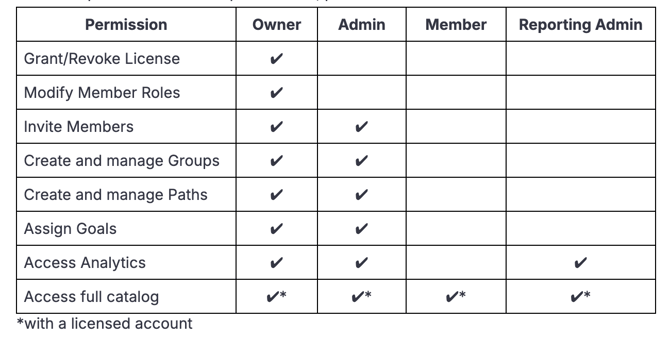
For a complete breakdown of user privileges, please reference the chart below:
- [Cybrary for Teams](https://help.cybrary.it/cybrary-for-teams?hsLang=en)
- [Cybrary Insider Pro](https://help.cybrary.it/cybrary-insider-pro?hsLang=en)
- [Content Catalog](https://help.cybrary.it/content-catalog?hsLang=en)
- [Learner Support](https://help.cybrary.it/learner-support?hsLang=en#main-content)
- [Get Started With Cybrary](https://help.cybrary.it/learner-support?hsLang=en#get-started-with-cybrary)
- [Tech Support](https://help.cybrary.it/learner-support?hsLang=en#tech-support)
- [Privacy Policy](https://www.cybrary.it/privacy-policy)
- [Cookie Policy](https://www.cybrary.it/cookie-policy)
- [Terms of Service](https://www.cybrary.it/terms-service)
- [Return to Main Website →](https://www.cybrary.it/)
[](https://help.cybrary.it/?hsLang=en)
[mailto:support@cybrary.it](mailto:support@cybrary.it)
Copyright © 2025, Cybrary