Learn what roles your users can have on Cybrary
Organization Owner - an Organization Owner is the user (or users) that has complete control over the team. They can:
- Invite members to the team and remove existing ones
- Manage user licensing to determine who has access to content included with Cybrary for Business
- Can create and demote organization wide admins
This user also has all of the functionality of the below Organization Admin role.
Organization Admin - an Organization Admin has the ability to manage users across the organization. They can:
- View a list of all users that are part of the organization
- Invite members to the team and remove existing ones
- Create, delete, and manage groups including add & removing members
- Create, edit, and delete curriculums for the organization
- Create and edit assignments for the entire organization or specific groups
- View reporting organization wide
Reporting Admin - a Reporting Admin has the ability to report on all users within an organization. This includes assignment reporting, "Reports by User", and "Reports by Content".
Group Admin - A Group Admin has many of the same abilities as an Organization Admin, but only over the group they are an admin of. They can:
- View a list of all group members
- Invite users to their group and remove existing ones
- Create and edit assignments ONLY for their group's members
- View reporting ONLY for the member of their group
Organization/Group Member - These roles are "standard" users. They can have access to all of the premium enterprise content but do not have any user/curriculum/assignment management privileges, and cannot access any reports.
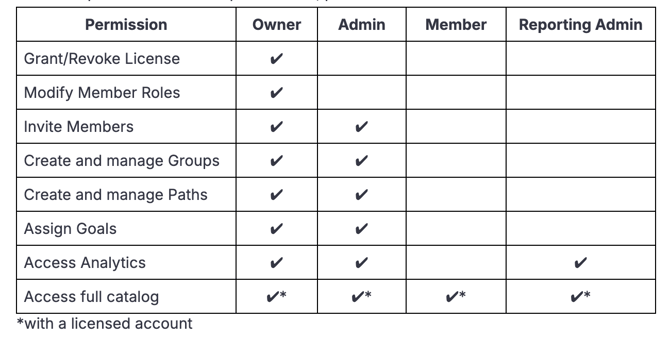
For a complete breakdown of user privileges, please reference the chart below: